
I recently had the chance to visit the Emerald City, and one store that I just HAD to stop at was RE-PC. For vintage tech nerds like me, RE-PC is up there with stores like FreeGeek as this mythical nerd-vana where you can find anything old & cool. Overall, it was pretty cool visit! The store itself is kind of a mixed bag, but the inventory they had was bonkers and the staff was friendly. Since we flew to Seattle, I was kinda limited in what I could bring home on the airplane, but one item caught my eye that I ended up snagging.
Which leads us, dear readers, to the Saitek PC Gamers’ Keyboard (yes that’s its real name). Hailing from the year 2004 it’s dripping in that early 2000’s silver over blue LED futuristic craze. This is a really cool example of early hardware that was made specifically to target the PC gamers we think of today. While not the first keyboard with a backlight, it was one of the earlier ones that the average gamer could afford. It retailed at $59 MSRP in 2004 ($109 as of May 2026).
Build and Layout.
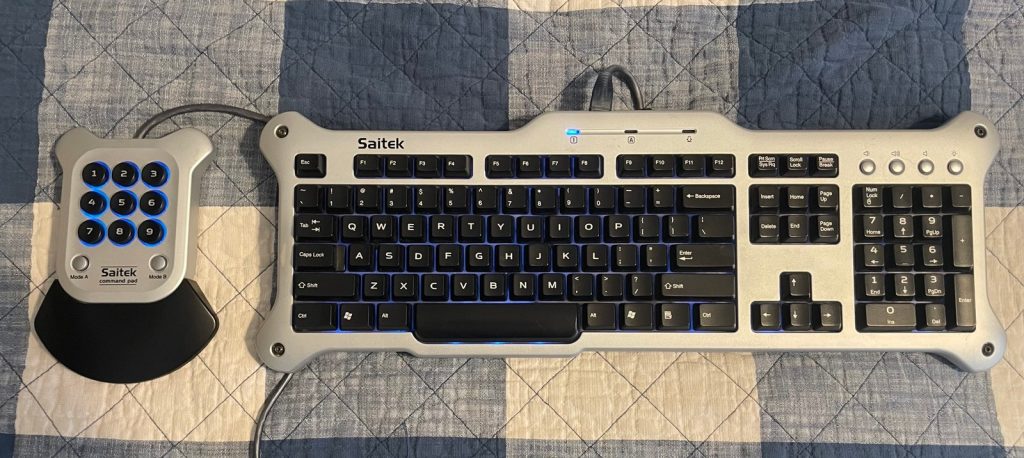
The first thing you notice at this keyboard, is just how freaking LONG it is. Now, I am no stranger to keyboards on the longer side. My daily for web and graphic work is a daskeyboard 3, but this thing is slightly longer than even that at 19″. Add in the included macro pad, and this is not small desk friendly. Surprisingly, for this era there aren’t a ton of media and web keys to wade through. Other than the standard full layout there are volume up, volume down, mute, and a button to cycle through backlight brightness (we will come back to this).
The reason for the lack of keys is pretty obvious. Saitek includes a 9 key “Command Pad” that you can program macros on. It has 2 shift keys allowing a total of 27 macros to be programed, and the command pad plugs into the keyboard using an RJ45 plug. At first that was kinda weird, but in retrospect for the time it kinda makes sense. Mini USB B was around but it had only been introduced 4 year prior with USB2.0 so it kinda tracks that RJ45 would be cheaper to stick on a $59 keyboard. Originally, this would have included a palm rest, but the one for this one is long gone. There are 2 plastic feet on the back to angle the board towards the user, with the feet retracted this is a very flat keyboard lacking the wedge shape of more traditional boards.
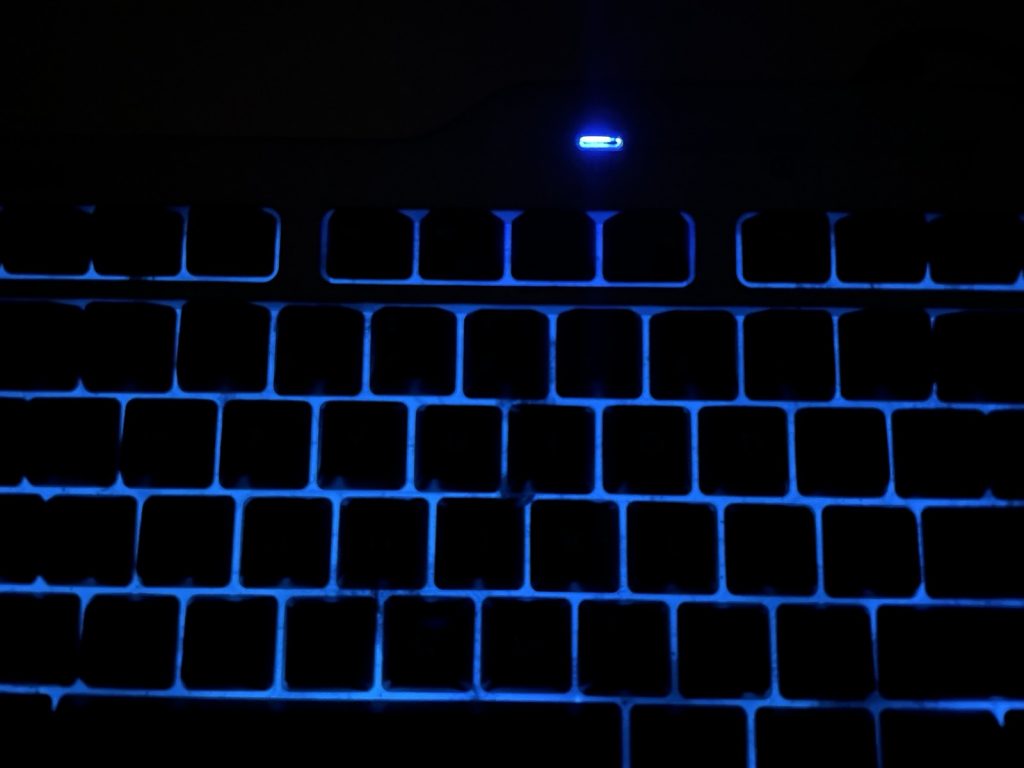
Okay, lets address the dim blue elephant in the room. The blue LEDs on this are….not great to put it mildly. At first I thought maybe they had just dimmed with age, however contemporary reviews from 2004 show even by their standards they were very lackluster. The keycaps lack a shine through legend, so the light shines around the key not through it. The LEDs are not per key, but rather its edge lit by 2 PCBs of LEDs on the bottom edge. It is worth mentioning that the Command pad uses per key LEDs that are quite a bit brighter than the KB. This photo was shot in a pitch black room with the monitor off. There are 3 brightness levels and that’s about as good as it gets.
Typing.
Now for how this keyboard types. I am not going to spend too much time on this section for two reasons. One, typing is subjective and everyone has their own preferences. Two, there isn’t a whole lot of nuance here, as you will see.
You might have guessed by the above information that typing on this is keyboard is not the greatest. Its not bad per se, but it’s what you would expect from an early 2000s keyboard that retailed for under $100. The key caps are decent and size and spacing is typical for a full size board, and they don’t rock about all that much. The deck flex is decent for a board with a plastic deck. One of my complaints is that the dog bone shape of the board, means the bezel corners stick out and at times this can be really annoying. I suspect with the OG palm rest this would not be an issue, but its something to keep in mind if you see one of these in the wild.
The macro “Command Pad” is an exception. It has very lovely buttons with a concave top that has an arcade feel. Travel is shallow but overall its a very nice device to use.
Compatibility.
As far as just a basic keyboard this should theoretically work with anything since its a generic p&p USB driver. If you want to use the macropad on the other hand though, you have a couple options.
I have not tested this with a PC, but there is still software on Saiteks site that claims compatibility. I thought about trying the software under WINE, but decided to go a simpler router. I used AntiMicroX to map keys to the command pad. It recognized the device straight away. I set up two different sets to shift through. Set 1 was mapped as hotkeys to bring up my drop down terminal, a web browser, signal, discord, etc. Set 2 was for gaming, so I mapped WASD to the macro pad and used it like a Nostromo. Which actually worked shockingly well, at least for slower games like Minecraft. AntiMicroX has versions for both PC and Mac so this solution should work anywhere.
Conclusion
From the moment I saw this keyboard, I knew exactly where it would fit in my collection. I have a RaidMax Smilodon Gamers Development Dirktooth PC case (a mouthful of a name, I know). It also hails from the early 2000’s with a massive silver door with blue LED’s and this board pairs perfectly with that case to build an XP rig in.
If you think you might want a Saitek board like this, then you’re in luck as they are still fairly cheap. I paid $30 for this one, and that seems to be about the going rate. If you are looking for one I highly encourage finding one with the palm rest included. Otherwise, if you like the style, but want something a little more polished Saitek replaced this with the Eclipse. They are near identical in stylistically, but have brighter LEDs, shine through keycaps and better construction overall. The Eclipse II and III continued in the same vane, but offered even more features like a volume wheel.
I knew when leaving for Seattle, I wanted to find something to bring home to add to my collection as a keepsake of my first visit. However, it had to be small enough to get home on the plane, but also not just be a paperweight sitting around collecting dust. This keyboard was perfect for that. It’s a cool time piece that will forever make me grateful that modern cheap keyboards come with a little more bang for your buck, but also it fits into my collection well.